
Who did your favorite creator recently follow? What posts keep catching someone’s attention? Which accounts did a person quietly stop following?
People come to Snoopreport with different questions about Instagram activity. Some want to explore someone’s interests through liked posts. Others want to keep up with recent follows, monitor changing connections, or research creators and competitors.
To make those questions easier to navigate, Snoopreport has launched a collection of 10 dedicated Instagram tracking solutions, covering everything from recent follows to liked posts and unfollows.
Each solution has its own page, with guidance and examples tailored to a specific use case. All connect to the same Snoopreport platform, where public Instagram activity becomes an ongoing record through weekly and monthly reports.
Here’s what’s included in the launch – and how each offering can help you explore the activity that matters to you.
Discover Snoopreport’s New Instagram Follow-Tracking Solutions
A Following list shows connections. Tracking how that list changes adds another layer: which accounts are new, which disappear, and how someone’s interests develop over time.
The new collection includes five starting points for exploring those connections.
One distinction applies throughout: Snoopreport tracks whom a public account follows and unfollows. It does not provide a list of people who follow that account.
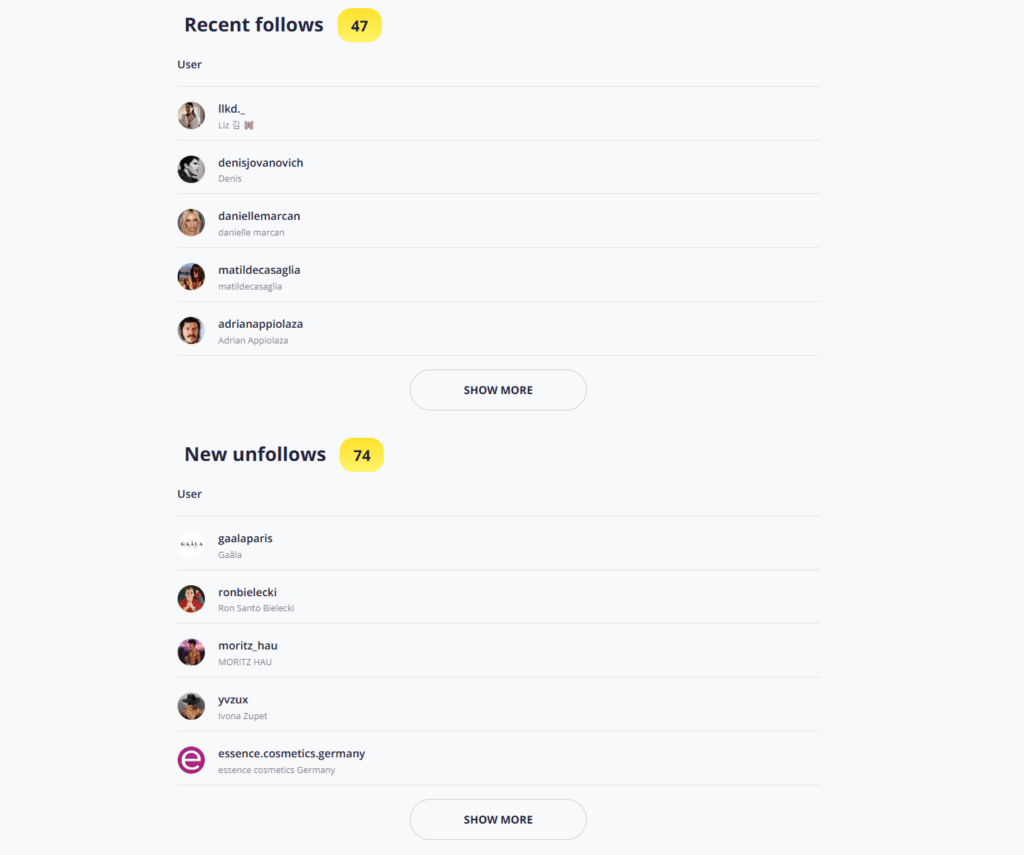
Have you ever wondered about the recent Instagram follows of your friends, favorite celebrities, or loved ones? Snoopreport is your essential tool for staying on top of all the latest follows and unfollows for any public profile!
1. Instagram Follower Tracker
Best for: getting an overview of someone’s changing connections.
The Instagram follower tracker introduces follow and unfollow monitoring for people who want to understand how a public account’s network changes.
Instead of repeatedly scrolling through a long Following list, you can review the additions and removals captured during each reporting period.
For example, a brand researching a potential creator partner could use these reports to explore which other creators and businesses that person starts following. Someone keeping up with a public figure could use the same information to discover accounts connected to their interests.
2. Recent Follow
Best for: focusing on the newest additions.
Our recent follow page centers on a straightforward question: which accounts has this person recently started following?
Reports group captured follows by week or month, helping you identify new connections without relying on the order in which usernames appear on Instagram.
Imagine a musician starts following several photographers, stylists, and visual artists. Those additions could introduce you to interesting collaborators or give you something to watch as their next project develops. A follow alone does not confirm a collaboration, but it can provide a starting point for further exploration.
This is Snoopreport’s recent-follow offering, separate from the similarly named RecentFollow service.
3. See Who Someone Recently Followed on Instagram
Best for: checking recent changes involving a particular person.
If you already have someone in mind, the guide to see who someone recently followed on Instagram walks you through tracking that public account’s new follows.
Perhaps a friend has developed an interest in hiking, photography, or a new music scene. Their recent follows may help you discover the accounts behind that interest – and give you something new to talk about.
The reports identify follows captured within a weekly or monthly period. They do not provide the exact day or time of every follow, so they’re most useful for understanding recent changes and recurring patterns.
4. See Who Someone Follows on Instagram
Best for: understanding a Following list and what changes within it.
Our guide to see who someone follows on Instagram starts with the broader question of someone’s existing connections.
You can inspect a public account’s Following list on Instagram. Snoopreport adds a record of detected changes, helping you move from “Are they following this account?” to “Has that connection changed?”
For example, you could first check whether a creator follows a particular brand, then track the creator’s public account to monitor subsequent follows and unfollows. This makes the page a useful starting point for readers who want both a basic explanation and a way to keep checking over time.
5. Instagram Following Tracker
Best for: building a longer record of changing interests and connections.
The Instagram following tracker emphasizes ongoing monitoring of the accounts someone starts and stops following.
This approach is particularly useful when your question cannot be answered by one profile visit. A creator may follow a few fitness accounts one week, several running coaches the next, and race organizers later in the month.
Reviewing those changes together can help you identify a developing theme. For marketers, that can inform further creator research. For individuals, it can offer a clearer view of the topics a public account is exploring.
Track the Other Side of Connections with the Instagram Unfollow Tracker
6. Instagram Unfollow Tracker
Best for: seeing which accounts someone stops following.
New follows attract attention, but removals can be easy to miss. The Instagram unfollow tracker focuses on accounts a tracked public profile unfollows during a reporting period.
For example, a brand researcher could monitor whether a creator stops following a business they previously followed. A fan could keep track of changes in a public figure’s connections without manually comparing long lists.
You can also track a specific public account to see whether a detected unfollow of your own account appears in its report. This is different from obtaining a complete list of everyone who unfollowed you.
An unfollow shows that a connection changed. The reason could be anything from a feed cleanup to a change of interests, so the action needs context before you draw conclusions.
Explore Snoopreport’s New Instagram Likes Collection
The accounts someone follows tell only part of the story. Individual likes can help you explore the content that attracts their attention, including posts from accounts they may not follow.
Three pages in the new collection focus on understanding likes from different starting points.
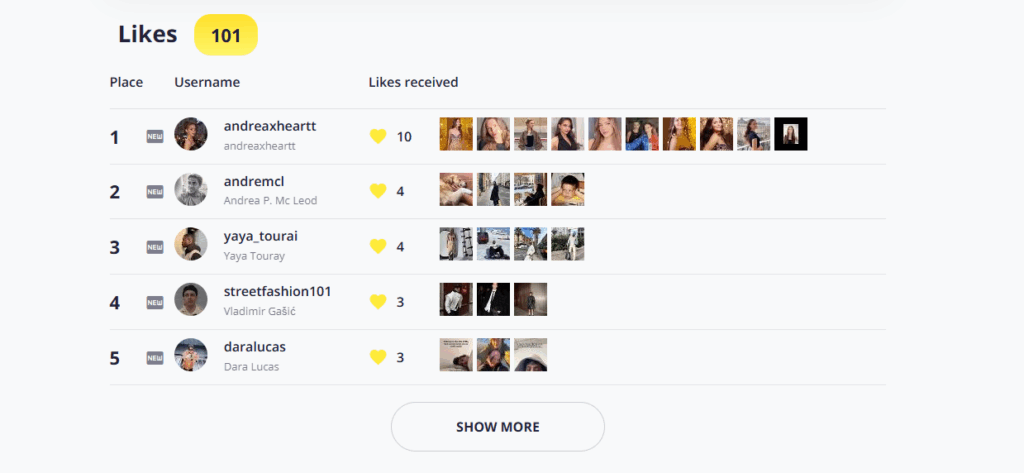
Since Instagram removed the “Following” activity tab in 2019, it has been impossible to see what other people like directly through the app. However, with Snoopreport, you can view users’ likes in convenient weekly and monthly reports.
7. See What Someone Likes on Instagram
Best for: discovering interests through one person’s liked content.
The guide to see what someone likes on Instagram focuses on exploring the posts and reels a public account likes.
That can be useful when you’re looking for shared interests, conversation starters, or gift inspiration. Repeated likes on baking videos might inspire a cooking-class gift. Frequent engagement with concert clips could introduce you to an artist worth mentioning.
The most useful insights usually come from recurring themes across a reporting period. One liked post is a small action; several related posts give you more context to explore.
8. Instagram Likes Viewer
Best for: browsing captured liked posts and spotting recurring accounts.
The Instagram likes viewer introduces the report itself: the captured posts and reels a public account liked, alongside summaries of the accounts it likes most often.
This is a practical starting point if you want to understand what you’ll be able to review after tracking begins.
For example, a content creator researching selected public accounts in their niche could explore which topics and creators repeatedly attract their attention. Those observations can inspire further research and content ideas.
The viewer focuses on what an account likes, rather than listing everyone who liked a particular post.
9. See What People Like on Instagram
Best for: understanding how likes visibility works.
Our guide to see what people like on Instagram addresses two related questions: how to explore other people’s likes and what others may be able to see about your own activity.
It explains the difference between finding someone’s username in an individual post’s likes list and reviewing captured likes across a reporting period.
It also covers a common point of confusion: hiding like counts changes the visibility of the numbers, rather than removing a like you’ve left on a post. This makes the page useful for readers who want to understand Instagram likes before deciding how to track them.
Bring the Activity Together in One Place
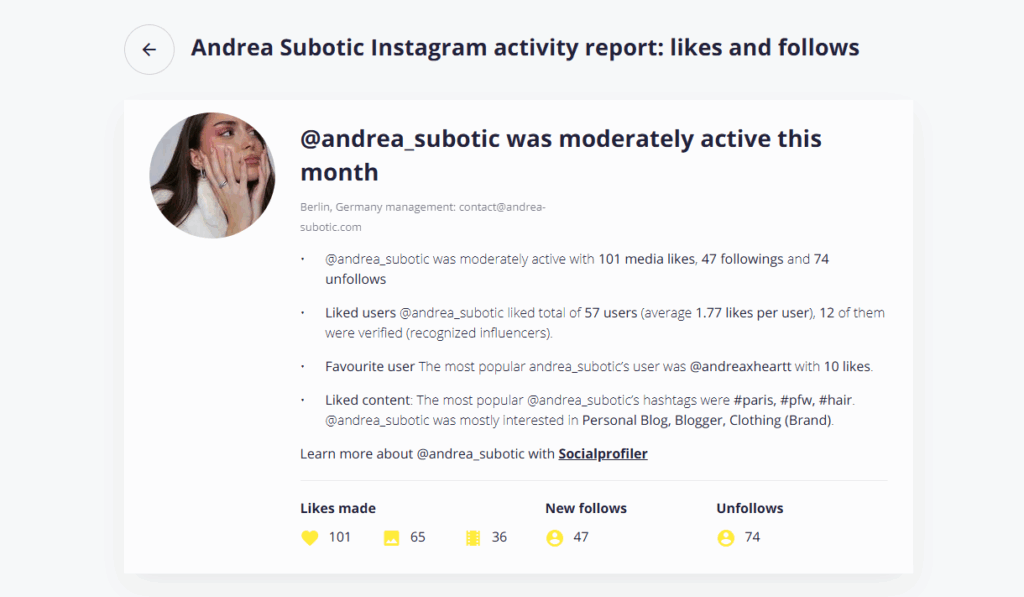
The Instagram activity tracker shows you more than just likes and follows. It also provides an AI-generated summary with unique insights, conversation starters, and date ideas.
10. Instagram Activity Tracker
Best for: exploring likes, follows, and unfollows together.
The Instagram activity tracker brings the collection’s main capabilities together for readers who want a broader view.
A new follow can become more interesting when it appears alongside repeated likes on related content. For example, a creator who starts following running coaches and liking marathon posts may be exploring an interest that a sports brand would want to research further.
Weekly reports help you review recent changes. Monthly reports provide a longer view of captured activity and recurring interests.
Here, “Instagram activity” means public likes, follows, and unfollows. It does not mean online status or the last time someone opened Instagram.
How to Start Using the New Collection
Each dedicated page leads to the same straightforward setup:
- Choose the page that matches your question. Start with recent follows, unfollows, likes, or overall activity.
- Sign up for Snoopreport and select a plan. You do not need to provide your Instagram password or connect your Instagram account.
- Add a public Instagram username in your dashboard. Regular tracking starts from the day you add the account.
- Review your weekly and monthly reports. Look at individual actions, then compare reporting periods to explore recurring patterns.
If you need activity from before tracking began, check the availability of retrospective reports, which are offered separately.
Snoopreport works with public accounts and does not capture every action. Reports do not include private accounts, direct messages, comments, story views, or online status.
Find the Right Starting Point for Your Instagram Questions
With this launch, Snoopreport gives users 10 dedicated routes into Instagram activity tracking, each organized around a specific question.
You might start by checking recent follows, then discover that liked posts provide useful additional context. Or you might begin with creator research and return each month to see how their connections change.
Explore the new collection, choose the solution that matches your interests, and start tracking a public account today.
